
Do you ever look at your task list and think — some of these don’t actually need me? Not in a dismissive way, but in an honest one. The gathering, the compiling, the translating information from one format into another. It gets done, but it doesn’t really require your thinking. It just requires your time.
That’s the question I found myself sitting with. Especially when the volume of tasks starts to pile up, the idea of handing some of them off to an automated flow becomes less of a luxury and more of a necessity.
I’ve already been using AI in my daily life for a while now. It genuinely makes things easier. But lately I’ve had this nagging feeling that I’m not quite there yet. I’m using it as a helper for individual moments — drafting something here, summarizing something there — but I haven’t really let it carry a full workflow on its own. There’s a difference between having a smart assistant and building a system that actually runs without you.
Naturally, I got curious and started exploring.
The Question I Wanted to Answer
What would it actually look like to automate a full workflow with AI? Not just trigger an action, but have the system gather information, process it intelligently, and deliver something useful at the end without me sitting in the middle of it.
I also had a practical constraint I wanted to respect: I didn’t want to spend hours building something I’d only use twice. The effort has to be worth it. If the automation costs more than the task saves, it’s not automation — it’s just a different kind of work.
But I do genuinely enjoy the try-and-learn approach. So I picked a real problem, something I actually deal with, and decided to use it as my experiment.
The Problem: Release Notes from a Code Repository
If you’ve ever had to write release notes, you know what this involves. You go through the commit history, try to make sense of messages that were written for developers in a hurry, and translate all of it into something that stakeholders can actually read and understand. It’s necessary. It’s recurring. And it’s a perfect example of a task that follows a very predictable pattern: collect the data, make sense of it, write it up, publish it somewhere.
That predictability is exactly what makes it a good candidate for automation.
Getting Started with n8n
To build the workflow, I used n8n. If you haven’t come across it before, it’s a platform that lets you connect different tools and services into automated flows . It also allows you to plug an AI model directly into the workflow. That last part was key. I didn’t want a system that just moved data around. I wanted one that could actually interpret it.
What drew me to n8n specifically was how approachable it is. You don’t need to be deeply technical to get something working. The interface is visual, the logic is easy to follow, and you can see exactly what’s happening at each step of the flow.
How the Workflow Comes Together
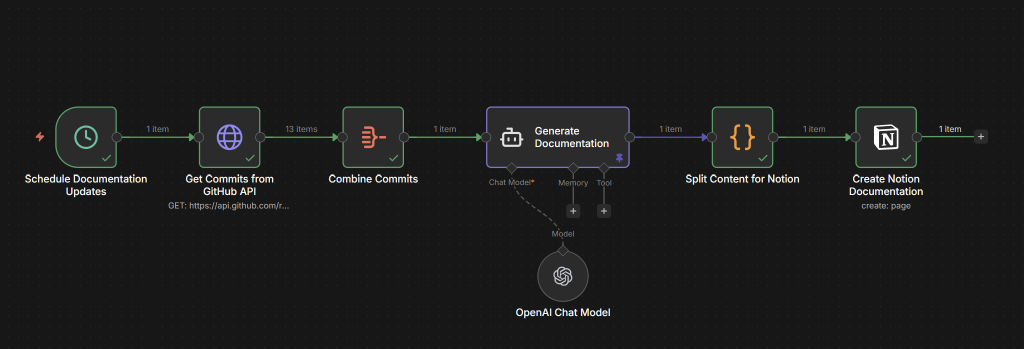
The flow I built runs in six steps, and each one has a clear job. Let’s walk through the logic:
- Schedule Documentation Updates: The process begins with a simple time-based trigger. No more remembering to “start the task”—the system handles it automatically. It can be triggered manually also.
- Get Commits from GitHub API: The workflow connects directly to my code repository (GitHub in this case) and fetches commits. This is the raw data.
- Combine Commits: These individual commit messages are then grouped together, preparing them for the next crucial step.
- Generate Documentation (OpenAI Chat Model): This is where the true delegation happens. The combined commit data is fed into an AI model (like GPT-4). My prompt directs the AI to analyze the technical changes and transform them into human-readable release notes
- Split Content for Notion: The AI’s output is then formatted. This node ensures the content is structured for next step.
- Create Notion Documentation: Finally, the release notes are automatically published as a new page in Notion.
From raw commit history to release notes — handled end to end, without me needing to touch it.
What I Actually Got Out of This
The time I saved was not even the most important part. What this experiment really did was open my eyes. I started seeing how many tasks in a typical week follow the same basic pattern — collect information, process it, send it somewhere. Once you notice it, you cannot stop noticing it.
And there is something reassuring about that. Knowing that a recurring task can actually be automated. It was a small experiment. But it proves something real.
Where Could This Go From Here?
This is the part I’m still thinking about, honestly. The scheduled trigger works fine, but I keep wondering — what if it fired automatically on every commit, or every time a pull request gets merged? The documentation would essentially keep itself up to date. That feels like it could be useful, though I haven’t tested how that holds up in a busy repository yet.
The other thing I find myself curious about is the data side. Commit messages tell you what changed in the code, but they don’t always tell the full story. A lot of the why lives somewhere else — in a Jira ticket, a TFS work item, a conversation that happened before the work even started. If you could bring those sources into the same flow, the AI would have much more to work with. Maybe the release notes start connecting technical changes to the features or fixes they actually represent. Maybe they become something your whole team finds useful, not just the people closest to the code.
I don’t know exactly what that version looks like yet. But this small experiment has made me genuinely curious to find out. If you end up trying something similar, I’d be interested to hear where you take it.
Further Reading & Tools
- n8n (Workflow Automation Platform) — https://n8n.io
- n8n Documentation — https://docs.n8n.io
- GitHub API Documentation — https://docs.github.com/en/rest
- Notion API Documentation — https://developers.notion.com





 Thinking Hub
Leave a comment