
Another weekend of mine, I came up with an app idea. I wanted to quickly see how it would look. Before deep diving into code development, I used Google AI Studio to help me visualize how it would look at the end.
I’m using AI tools in different areas. It helps me research new topics and find answers easily. But that’s not it. I usually prefer to try out new things and build apps with AI to explore the limitations of AI tools in software development.
After trying a couple of things in Google AI Studio, I switched to my regular development environment: Visual Studio Code and GitHub Copilot. Since I already had the license, I created a prompt to develop a mobile app that I had in mind. Agent mode of GitHub Copilot is self-explanatory with the steps it’s doing. I haven’t specified the technology stack but gave the limitation that it should work on both Android and iOS.
Why This Workflow Shines
I deliberately chose technologies I don’t use frequently for this project. This is where AI tools really shine. When you’re working with unfamiliar frameworks or languages, AI definitely speeds you up. No more spending hours reading documentation or searching Stack Overflow for basic syntax. The AI handles the groundwork while I focus on understanding the broader concepts.
The Reality Check: When “First Drafts” Fail
With the first iteration, even if it promised more than it does, initial build failed with many test scenarios. I continued with my tests and prompting to fix the issues I had experienced. I found myself in a loop: I would test, find a bug, and prompt Copilot to fix it.
Yes, yes, I know. It can also do the test but I was in excitement to see results. Whenever I tried it, I faced another issue. So I stopped iterating with GitHub Copilot and thought about something else.
What Are We Doing in Regular Software Project Cycles?
In a standard development cycle, we don’t just “jump in.” We refine requirements, create task lists, and prioritize. I decided to mirror this professional workflow using GitHub Projects and Copilot.
- Requirement Refinement: I described the product to Copilot and asked it to generate GitHub Issues.
- Delegation: I assigned the first issue to the Copilot agent directly within GitHub.
- Peer Review: Once the agent finished, it requested a review—just like a developer would.
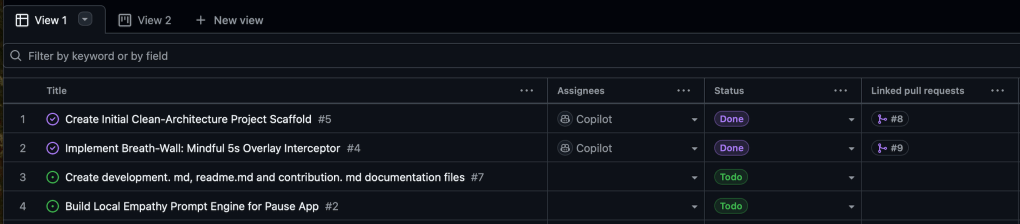
The Hybrid Review Process
I didn’t just merge the code. I asked Copilot to review its own work first. Copilot review revealed many points also. Review points can be simply resolved by agent again if you @copilot in the comment.

After my review, I realized several points. Before merging code directly, I wanted to try it in my local environment. So, I set up IntelliJ Community Edition and enabled the GitHub Copilot plugin also. On top of Copilot’s changes, I had to fix dependency issues and many Gradle configuration errors . After the verification, I accepted the pull request and merged PR to the main branch.
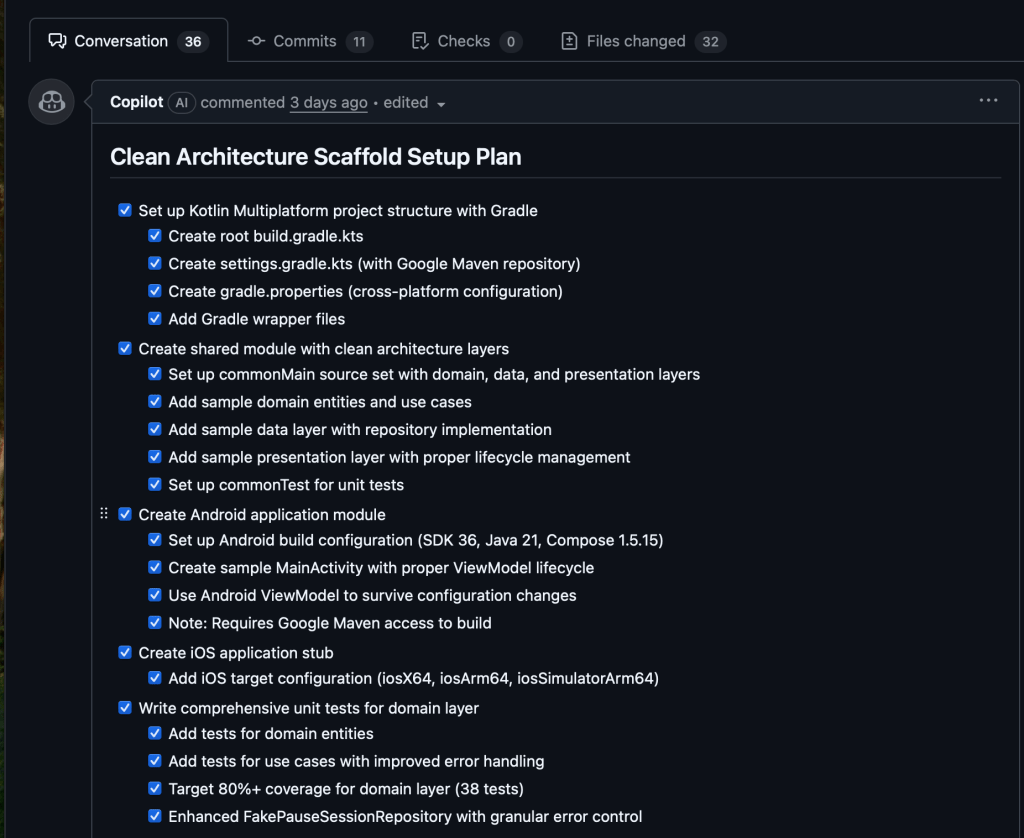
The Second Iteration
Then iteratively, I assigned the second issue to the Copilot agent. The agent used Claude Sonnet 4.5 model. The outcome was pretty good compared to my less detailed description about UI appearance.
But the real surprise wasn’t just the code, it was the feeling. Issue by issue, the workflow started to feel natural. I wasn’t just prompting anymore, I was collaborating.
Early Observations
These first few iterations revealed interesting patterns.
- Speed: Working with unfamiliar technologies became significantly faster. What would normally take me days of learning and experimenting happened in hours. The AI bridged the knowledge gap effectively.
- Consistency Issues: But I also noticed inconsistencies. Sometimes the results were impressive. Other times, I spent more time fixing issues than expected. The quality varied significantly between iterations.
- The Big Question: Am I using these AI tools the right way? Is there a better approach to structuring my workflow with coding agents?
What’s Next
I decided to pause and do some research. GitHub has published best practices for using Copilot coding agent to work on tasks. Before continuing with more iterations, I wanted to understand whether following these guidelines would improve my results or not.
In the next article, I’ll share what happened when I reconfigured my coding agent based on these best practices. Did it make a difference? Did the quality become more consistent? And most importantly, did it actually speed up development or just add more complexity?
Stay tuned for Part 2, where I’ll dive into the results of applying structured best practices to AI-assisted development.





 Thinking Hub
Leave a comment